
The Editor’s Assistant
Skills Reuse
I’ve been writing macros for MS Word since version 2.0, long before “Word Basic” was reinvented as Visual Basic, and before the Word object model was surfaced. I automated pretty much the entire document set for our OS development team from 1990-95. Away from work, I gradually developed a substantial code suite to support my 20-year role as a correspondence course tutor – onboarding, progressing, marking, and terminating student registrations and recording those marks (Excel integration!), calculating averages and updating a dashboard of historical stats (yeah, I’m a stats nerd too).
So it was a natural step, when I started writing, to apply these skills to my manuscripts to help with some of the editing. Some powerful author/editor tools are available online – I don’t need to mention them by name – but they’re not cheap. And I am. So I fall back on a home-grown alternative, “leveraging” the skills available to me.
Recently, I reached that editing step in my WIP: running some code I’ve given the snappy title of MarkDeprecatedWords against the 120,000 word m/s.
 When it’s finished, it appends this report to the last page of the document. The word count is inflated owing to a quirk of the Word object model. It counts all sorts of extra fragments as a “word” – the most obvious example that springs to mind (if my memory is accurate) being the punctuation at the close of a speech. Usually something like comma-close-quote or period-close-quote.
The highlights in this image are peppered throughout the text ready for me to do another pass, examining each and deciding what to do about them.
Proximity Words
I’m particularly pleased with this one. I noticed early on in my writing career that when I’m drafting, words tend to get “stuck” in my mind, and I’ll use them again pretty soon after the first instance. I don’t like this – it reads very clunky, and inaccurately suggests a paucity of vocabulary, when really it’s nothing more than a drafting tic. It comes from writing in “creative mode” with my inner editor silenced, which is how first drafts should be written. This highlighting merely serves as a helper to the editing pass to flag them up.
So the code maintains a rolling array of 40 words (an arbitrary size), against which it checks each new word it deals with. After ignoring common words like the, and, etc, any hits are highlighted in Pink. If the word isn’t found, it’s added to the array, retiring the oldest unmatched word once the array is full.
Adverbs
I don’t have as much antipathy towards adverbs as my younger daughter, but they can be a warning flag for telling, rather than showing. This part of the check is very basic: it simply looks for words ending “-ly” after ignoring obvious candidates like only, family, early, etc. Obviously (lol) not all of these are adverbs, but many are. Flagging them up (in Green) helps decide whether the text needs changing to avoid their use.
Noise and Quirk Words
Two further drafting tics of mine and, I suspect, many writers: including noise words (just, really, that, very, quite, …) and other useless modifiers, along with a list of personal words I tend to overuse. Things like rictus, habitually, haunted, erstwhile, denizen, etc really ought to be used only once or twice per manuscript (if at all, lol).
This list grows by 3-4 with each new work. They’re highlighted in Teal.
Poor Style
This is mainly a check for three things: passive voice; overt thinking; and laziness.
I don’t know about you, but I have a habit of dropping into passive voice when drafting, and for the final work I’d prefer to avoid it wherever possible. There are rare occasions when a sentence would have to be run through a spiralizer, and then a blender, and then flattened by a couple of passes through a pasta maker, before you can wrangle it into something without p.v. If that’s the case I’d leave it as is. But mostly, it can be rewritten stronger and better.
Words like thought, pondered, realised, etc, are evidence that you’re documenting the MC’s thoughts. Since the reader is already in the head of the thinker (at least, in the POV I write in), thoughts should simply be expressed directly. “He thought,” or “she realised” needs mostly to be avoided.
The laziness check covers words like went and got. I saw a writer’s meme once that listed the 200 alternatives to “went”, and I’m sure got has an equivalent list.
All these style checks are highlighted in Turquoise.
Once this run is complete, the follow-up editing task involves donning my sunglasses against the glare of all these highlights, and going through the text making all the necessary corrections. You won’t be surprised to learn I have another very small, but very handy macro for removing highlighting.
Addendum on the Word Object Model
When I first wrote MarkDeprecatedWords, I was in a hurry and knocked it up the way that seemed most obvious at the time. The words in a document can be accessed as an array, and that’s what I used first: Document.Words(I), for incrementing values of I.
The first time I ran it against a 100,000 word manuscript it took 36 hours to complete. I added (belatedly, I admit), some metrics, which demonstrated quite graphically that the code was running slower and slower over time.
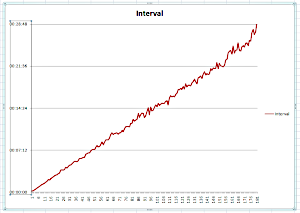 Recording a timestamp for each successive 1,000 words showed increasing intervals as it chewed through the document.
Seemed pretty obvious to me that the Word developers had not been very creative in their implementation of that array of words. Possibly not really expecting anyone to use it. The most likely explanation for the ongoing increase in interval, is that indexing the array counts through from “1” every time!
I sought out an alternative, and encountered the structure I should’ve been using from the start. The set of words. Changing the iteration from an indexed array to…
For Each objWord In docForMarking.Words
[ do some stuff ]
Next objWord
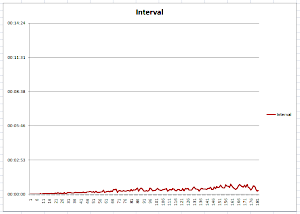 …had a radical effect on execution time. As you can see from the completion report at the top of this post, it can now zip through 156,000 “MS Word” words, or 120,000 actual words, in a little over half an hour.
The effect is even clearer when graphed up with the same 1000-word interval timings.