
Analysing Sentences
Using code to help with editing
As I first mentioned in The Editor’s Assistant, I’ve been writing macros for MS Word for many years.
A little more than ten years after I wrote the macro mentioned in that post, I encountered the concept of “Glue Index” (and therefore “sticky sentences”). Also, around the same time, I discovered the existence of guidelines for balanced sentence length to aid comprehension and “comfortable” reading.
While this varies by audience and the nature of the writing, and – with fiction – from genre to genre, as a general principle it’s wise to keep average sentence length to between 20 and 25 words. Variety is good too. You don’t want large collections of short sentences, which can make the read feel “choppy”. It’s good for action passages, to give a sense of urgency/danger/etc, but you can’t keep that up for too long. It’s emotionally exhausting. Similarly long passages of overlong sentences can tire a reader out, or even worse annoy them. Hence “average.”
If you’ve read that previous post it’ll come as no surprise that I coded this up.

My AnalyseSentences macro runs through a document counting the words in each sentence and adding them to an Excel table, after which it’s easy to create the kind of graph seen above. In this case it’s a run against my latest manuscript – A Flame In The North – which currently sits at 107,000 words. The run took eleven minutes.
From that visual it’s easy to see that the average sentence length is somewhere around 10-15 words*, which is great, but you can also see quite a few outliers. Several between 50-60 words and one behemoth of over 70 words. This is another drafting tic. I will have let my mind run riot while writing, just basically recording a kind of stream of consciousness. It clearly needs some serious editing!
But help is at hand, because as well as writing these sentence lengths into Excel, AnalyseSentences highlights the long sentences it finds, so it’s easy to scan through the document, find them, and chop them up a bit.
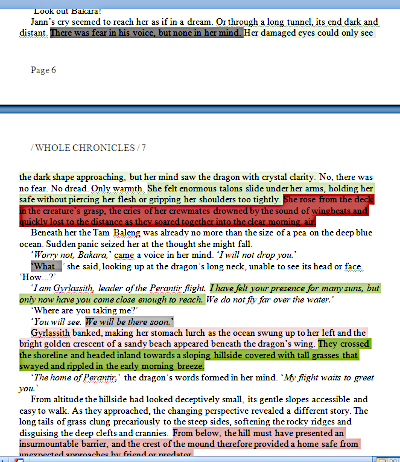
I use red for long sentences – anything over 25 words – and cycle through four different shades of red because often consecutive sentences have the same problem and this method makes it easier to differentiate them. I’ll read each one and decide whether it can stay as it is (for example if it’s one long sentence in a group of shorter ones), or needs to be split up. Run-on sentences are particularly easy to handle in this context – they are almost always stronger when split into two parts.
I also flag “outlier” sentences (longer than 50 words) in bright red because I can’t allow them to persist into the published work. They have to be split up or rewritten.
Sticky Sentences
Since this macro is handling sentences, I also calculate the Glue Index (you can Google it) of each one and highlight any that have a GI of 45% or higher in grey. Once again I cycle through four shades of gray (not 50!) for clarity. With short sentences (5-10 words) the GI is often unrepresentative. They’re not usually a problem. But many longer ones with high GI can be strengthened and I do switch some of them up during the read through.
Poor Style
Finally, four shades of green highlight two style issues: starting a sentence with a pronoun, or with a participle (I simply check for any word ending -ing). These aren’t hard-and-fast grammatical rules. Years ago some grammarians frowned on pronoun starts, but it’s very common in fiction and no longer considered a problem. But like so many things, it can be overdone, and this is especially true when drafting. Too much “he did this, she did that, they did the other” becomes repetitive and boring. So I flag them up for consideration, while at the same time being conscious that many (most) of them won’t need changing.
It’s a similar story with participles. “Rounding the corner, I encountered a man in a dark jumpsuit and a mask.” No problem. But again a little of this goes a long way. If every sentence starts like that it can be mind-numbing. And there’s the constant danger of dangling participles. Ain’t nobody needs that! So here again the highlighting draws my attention to something that may need to be checked out, but which will probably be OK.
*Having all the data in Excel makes it very easy to calculate this post-hoc. The actual average sentence length for this novel is 11.2 words.
Addendum: a sad glitch with Word2007
Shortly after I first wrote AnalyseSentences in 2019, I added a dialog box at the start of the run to make to analysis a little more flexible.
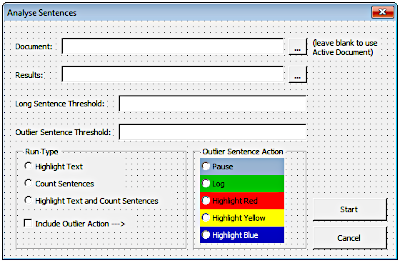 This made it easier to vary where the results were recorded, and change the values of the sentence lengths (defaulted to 25 and 50 as mentioned above) that would be flagged. It worked fine for several years, until…
Earlier this year when I attempted to run it against A Shadow On The Water. It crashed Word. I didn’t have time to diagnose the problem back then, but I have now. It crashes on the point of displaying this dialog.
I had a few attempts at fixing the fault, but in the end I’ve concluded it’s probably down to my set-up. I’m still using Word 2007 – 17 years old and out of support for some time. My PC runs Windows 2010 and the .NET framework too has changed considerably, so it’s seems likely that some combination of all of that makes the dialog barf.
But in all honesty moving away from the defaults was only a “nice to have.” It was a simple change to comment out use of the dialog, and set all the default values in a short chunk of code, which is easy to change if I ever feel the need to wander off piste. In that revised state, it runs just fine. But it does give me sad face to see physical evidence that my time using Visual Basic to make some aspects of life easier may be coming to an end.